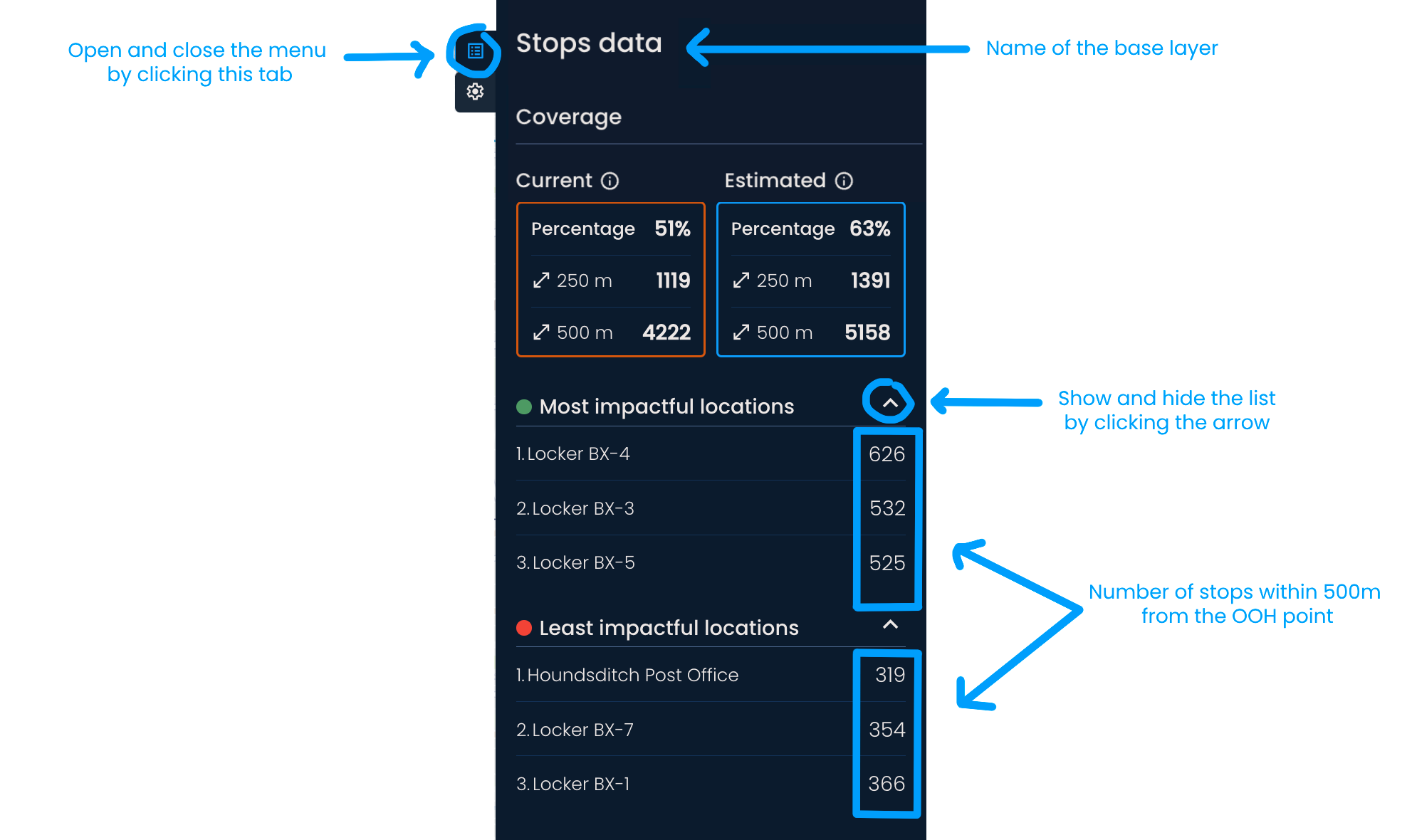
The Coverage panel provides an overview of the current network and helps you understand the impact of future decisions, such as adding, removing, or relocating OOH points.
You can activate it by:
Showing the current network
Generating new locations
Clicking the Coverage tab in the upper right corner

From top to bottom, the Coverage panel contains:
Information about the base layer - At the very top of the menu, you will see the name of the chosen base layer, which is used to calculate coverage.
The number of parcel lockers and shops - If you have an existing network, below the base layer name, you will see the number of OOH points in the delivery area by type.
Current coverage - In the orange rectangle, you can find:
The current network coverage in percentage
The sum of data points within 250 and 500m (or 5 and 10-minute walking distance) from each parcel locker and shop
Estimated coverage - In the blue rectangle, you can see the potential coverage created by changes to the network (adding or removing a pin, disabling or enabling existing locations, or generating new locations).
Most impactful locations - A list of three existing OOH points with the highest coverage compared to the rest in the delivery area.
Least impactful locations - A list of three existing OOH points with the lowest coverage compared to the rest in the delivery area.